Frame Inspector
Live Frame Inspector
The Frame Inspector allows real-time inspection of World of Warcraft UI frames.
It is designed to answer one question quickly:
“What is this frame, and what is it doing right now?”
Overview
The inspector provides a live view into the UI hierarchy and selected frame state.
- Frame tree navigation
- Property inspection
- Event visibility
- Geometry and anchor details
Screenshot
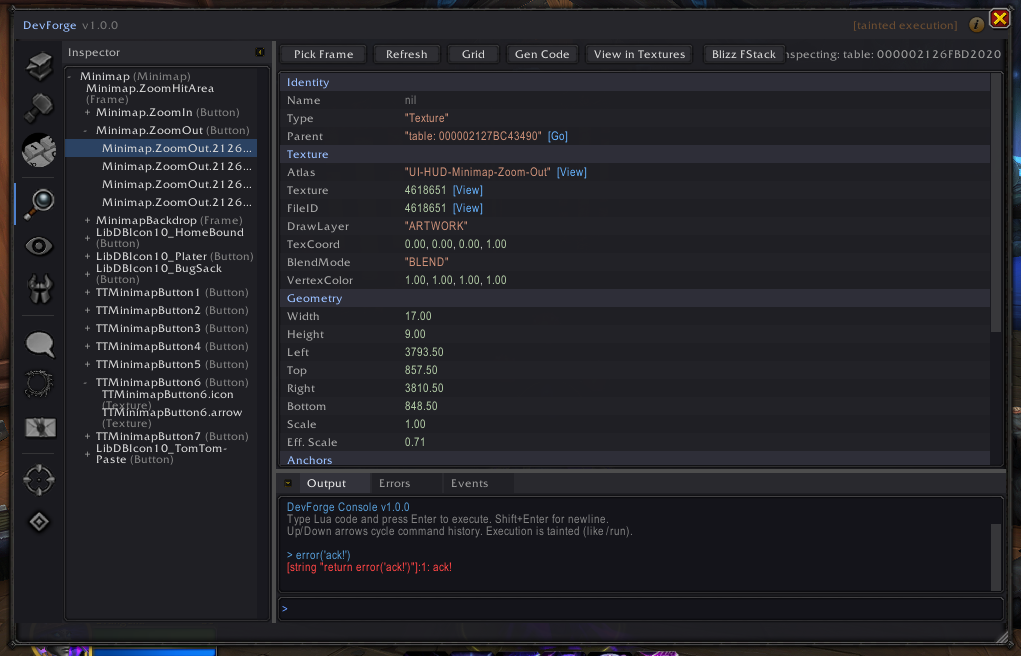
Frame Tree
The left panel shows the active UI frame hierarchy.
- Expand and collapse frames
- Identify parent/child relationships
- Quickly locate Blizzard and addon-created frames
Selecting a frame updates all inspection panels in real time.
Frame Details
For the selected frame, the inspector exposes:
Identity
- Name
- Type
- Parent
Geometry
- Width / Height
- Screen position
- Scale and effective scale
Visibility
- Shown / Visible state
- Alpha and effective alpha
- Strata and frame level
Anchors
- Anchor points
- Relative frames
- Offset values
Events & Scripts
The inspector lists:
- Registered events
- Script handlers (where accessible)
This makes it easier to understand why a frame updates or reacts.
Integration Tools
- Jump directly to Blizzard’s Frame Stack for the selected frame
- Generate helper code based on the selected frame
When to Use the Inspector
Use the Frame Inspector when:
- Debugging layout or positioning issues
- Identifying unknown frames
- Understanding Blizzard UI behavior
- Writing or fixing UI hooks