Editor
Code Editor & Project Tools
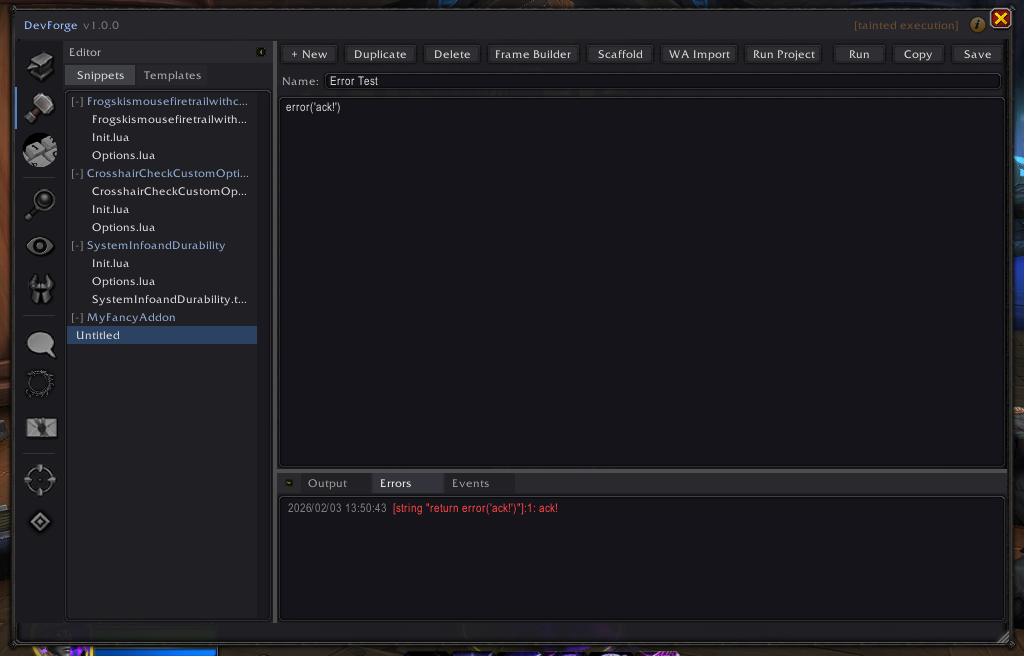
The DevForge Editor provides an in-game workspace for authoring, organizing, and managing Lua code used during addon development.
It complements the Console by focusing on structured code, not ad-hoc execution.
Overview
The Editor is designed for:
- Writing reusable code
- Managing experiments over time
- Transitioning from prototypes to addon-ready logic
It acts as a lightweight development environment inside the game client.
Screenshot
Capabilities
Snippets
- Create named Lua snippets
- Organize experimental or utility code
- Duplicate and iterate safely
- Execute snippets directly when needed
Snippets persist across sessions and serve as a working notebook.
Templates
- Store reusable code patterns
- Reduce repetition when creating new logic
- Use templates as a starting point for projects or experiments
Project Scaffolding
The Editor includes tools to:
- Generate addon skeletons
- Create standard file layouts
- Define entry points and options files
This helps move from experimentation to real addon structure.
Relationship to the Console
- Editor: write, organize, and manage code
- Console: execute and inspect runtime behavior
Both can execute Lua, but the Editor emphasizes structure and reuse, while the Console emphasizes immediacy.
When to Use the Editor
Use the Editor when you want to:
- Preserve working code over time
- Refactor experiments into reusable logic
- Scaffold addon projects
- Bridge existing workflows into addon code