DevForge
DevForge
DevForge is a developer toolkit addon for World of Warcraft.
It brings inspection, debugging, and exploration tools directly into the game client, designed for addon authors and technical users who want deeper visibility into WoW’s UI and API systems.
What DevForge Does
DevForge provides tools to:
- Inspect live frames, objects, and tables
- Observe events and runtime behavior
- Execute Lua snippets safely
- Explore available APIs and assets
- Debug errors and performance issues
All from inside the game.
In-Game Tooling
DevForge operates entirely in-game, providing interactive tooling that reflects the live client state.
Code Editor & Project Tools
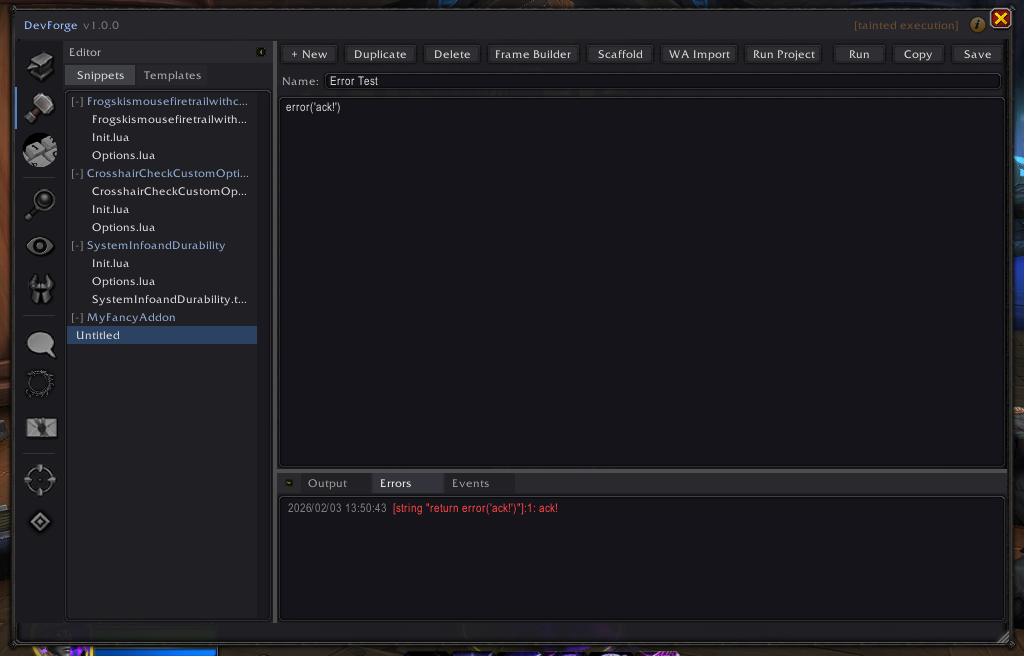
Write, organize, validate, and evolve Lua code directly in-game, including snippet management and project scaffolding.
Live Frame Inspector
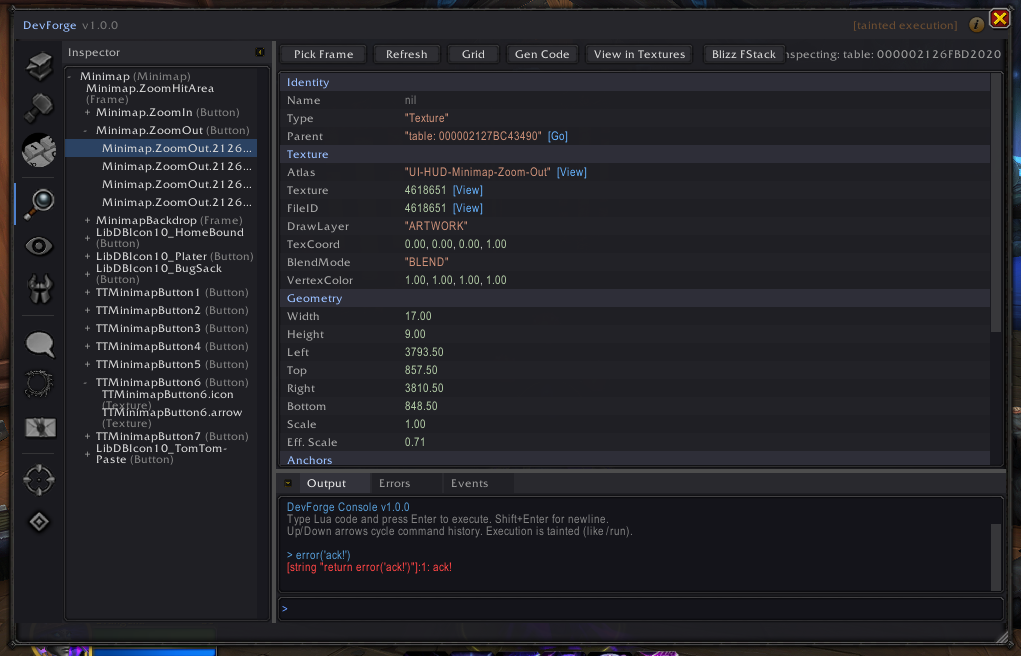
Inspect live UI frames in real time, including hierarchy, geometry, anchors, events, and scripts.
Feature Overview
DevForge is composed of a set of focused tools that can be used independently or together during addon development and debugging.
Each feature is documented individually with screenshots and usage notes.
Core Tooling
-
Code Editor & Project Tools
Manage snippets and templates, and scaffold addon projects. -
Interactive Lua Console
Execute Lua snippets, inspect runtime state, and experiment safely in-game. -
Frame Inspector
Inspect live UI frames, geometry, anchors, events, and scripts in real time. -
API Browser
Explore available APIs and namespaces based on the active client environment.
Asset Exploration
-
Texture & Atlas Browser Browse runtime-loaded textures, atlases, and visual assets with grid preview.
-
Sound Browser Explore SoundKit IDs, FileID ranges, and live-captured sounds with in-game playback.
Runtime Observation
-
Event Monitor Observe live events, inspect payloads, and filter noisy event streams.
-
Table Viewer
Explore Lua tables, SavedVariables, globals, and runtime state interactively. -
Error Review Panel
Review captured Lua errors with stack traces and local variable inspection.
System & Diagnostics
-
CVar Viewer & Maintenance
Inspect and manage client configuration variables safely. -
Macro Editor & Validation
View, edit, validate, and test account and character macros. -
Performance Monitor
Inspect addon memory usage and optional CPU sampling over time.
Client Support
- Retail: Fully supported
- Classic (current line): Actively targeting parity
- Classic Era: Planned
Features automatically adapt based on client capabilities and available APIs.
Installation
Download the addon and extract it into your WoW AddOns folder:
World of Warcraft/
Restart the game or reload the UI.
Project Status
DevForge is under active development. The current release is r1.0.13.
Documentation, contribution guidelines, and additional tooling details will expand over time.
Links
- GitHub Repository
- Issue Tracker
- Architecture Overview
⚠️ DevForge includes tools that allow live Lua execution.
It is intended for development and debugging use only and does not automate gameplay or bypass secure systems.
Disclaimer: Despite the similarity in naming, DevForge is not affiliated with, endorsed by, or associated with CurseForge or any of its parent entities. CurseForge may be used solely as a third-party distribution platform.